I have a dream church. It wouldn’t be to everyone’s taste. I have friends who love going to mega-churches with professional preaching, professional musicians, and professional productions of the service. It is a sort of Broadway production in their hometown, complete with “Broadway stars”. I’ve tried it and it’s great. Combined with small accountability groups, a church like that can even bear spiritual fruit. But that kind of church isn’t my dream church.
Although, I knew Rev. Gluck, aka “Joe”, most of my youth through young adult life, I missed the opportunity to attend his Forks-of-Cheat Baptist Church until near the end of Joe’s life. Yet, those few years left an indelible imprint on me. It was the closest I ever came to my dream church. We met in an historic church building that got its first indoor plumbing about the time I graduated from high school. Prior to that you trotted out of the building to go to the outhouse beside the grass parking area. The architecture was typical of the colonial period except that it was built of brick. The building was small but comely.
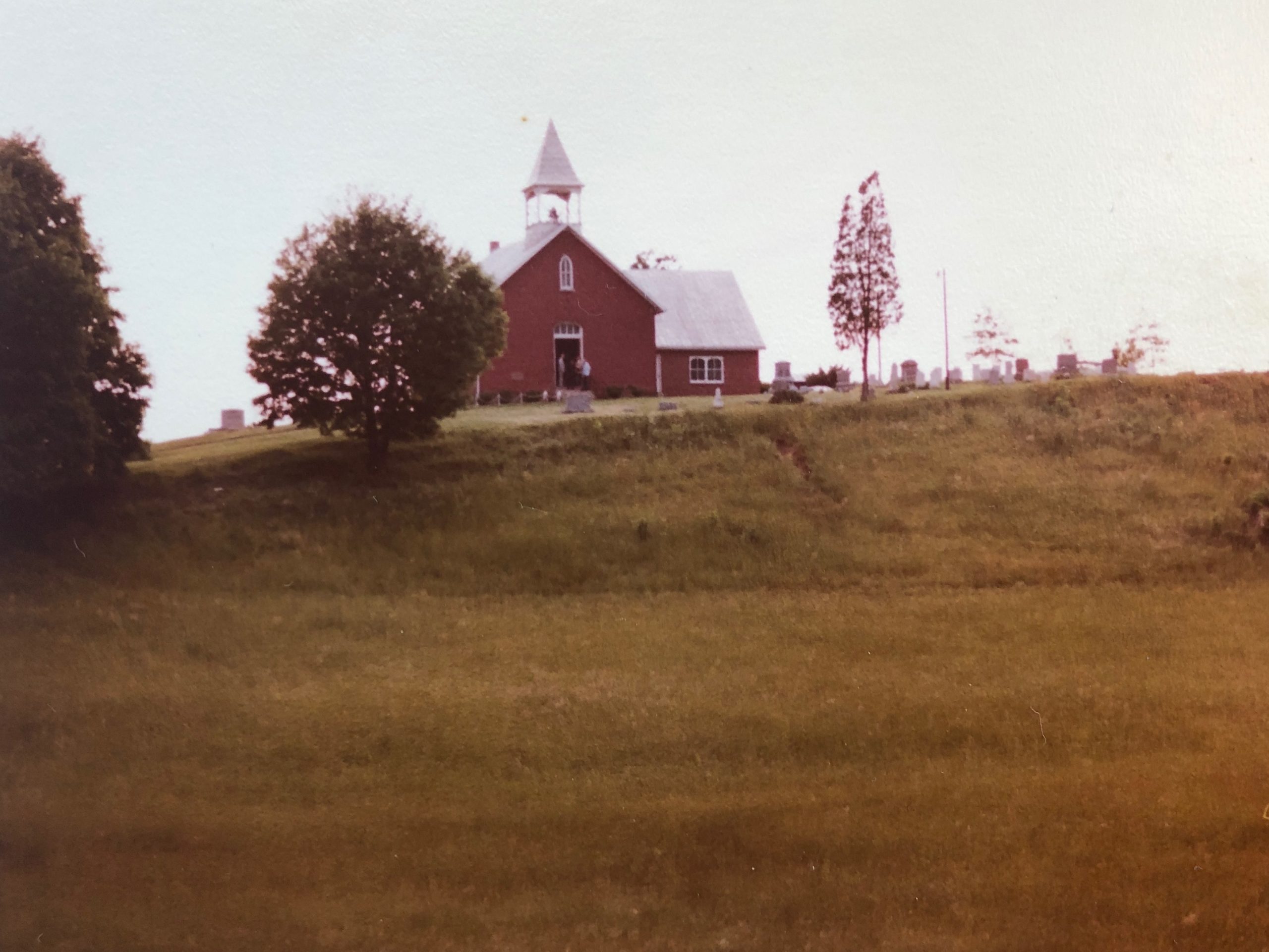
The church sits atop a hill and when you opened the doors you beheld a vista that stretched across the Cheat River valley to the Preston County ridge marking the beginning of the Appalachian Mountains. Whatever the merits of the Sunday school class and sermon we heard while inside with the doors closed, we were reminded that God was the Creator, the Source of nature’s beauty and agriculture’s bounty as we exited the doors.
And, yes, just as some are bedazzled by Broadway-style worship productions, I am bedazzled by the aesthetics of a little country church resting on the hilltop looking out over some of the most beautiful scenery on God’s green earth. So, yes, my dream church would be beautiful.
For your inspiration or just indulging my desire to think about them, allow me to share a few of the places of worship I have found to be inspiring. If I included all of the places I have worshipped that didn’t have a roof, I wouldn’t live long enough to finish telling the story, so I’ll limit myself to places of worship that have a roof.


I’ve already told you about Forks-of-Cheat. Second on my list, would be the little chapel at what is now Jacksons Mill in West Virginia. This little chapel has a phalanx of tall skinny windows running down each side of the sanctuary that can be cranked open to let in such a view of the nature outside as to make it feel almost like an outdoor service. There is even a little courtyard, bounded by a low stone wall, to one side of the chapel. What a great place for a church picnic, or pre-service coffee and donuts, or even a wedding reception.

There is a similar, if slightly larger, structure in Lahaina on Maui. The Holy Innocents Episcopal Church carries the windows which open to nature to an even higher level, which might be expected from a church located in an earthly paradise (with regard to weather).
Sandbridge Beach is very developed now and I suspect the old pavilion has been replaced by a strip mall or hotel. But there used to be a pavilion on the beach where local churches rotated providing vacationers with a place to worship God on the beach. Since it was only in service during tourist season, there was no need for walls at all.
I believe that God created beauty because God is beautiful. The church building, which should be beautiful, should also facilitate the appreciation of nature’s beauty just outside her doors to the degree the climate of the area will permit.
But the most beautiful thing about Forks-of-Cheat was not the colonial architecture or the heavenly view. The most beautiful thing about that church was the people of the church. We had Bea the eccentric artist, Helen the down-to-earth Sunday school teacher, the dairy farmer and his pharmacist son, the guy with a garden big enough to share its bounty with everybody, a car salesman, and so on. Being in the countryside, outside a college town with a medical center, meant we had professionals, union tradesman, farmers, artists, and every other variation of human nature one might imagine. And in this divisive, hate-filled era, I long for those days when such diverse people gathered together each Sunday to create a sanctuary where we could all come and find love, fellowship, and belonging.
As I mentioned, as you left the sanctuary the double doors would be swung open to the view. To the left of the doors there were hooks to hang your coats on the wall. To the right of the doors, there was a table. I’ll call it “the sharing table”. If a person had extra garden produce, they brought it to church and set it on the table. It was free for anyone to take. It was a different kind of communion table, a symbol of the family-ness of the fellowship. My dream church would be a sharing church-in touch with and addressing the needs of our community without condescension or fanfare. And there would most definitely be a sharing table.
A great example of sharing with the community is Scott’s Run Settlement House. Started by the women of the big Methodist church in downtown Morgantown, SRSH was established to provide resources to those in need in nearby Osage, WV. Their food pantry, baby pantry, periodic free medical clinics, after-school program (with free dance or music lessons and basketball), etc. made (and still make) a great difference in the lives of many people. When I was a youth, I dropped off supplies from my youth group to the food pantry. My contact was an elderly, retired black man who donated his time to teach kids to play the piano after school. That visit branded itself into my psyche as a model of what the church could and should be doing in the community. My dream church would definitely have a close partnership with a ministry like this one.
So far my dream church would be aesthetic, connected with the nature outside her walls, diverse and inclusive, and innately sharing.
That list sounds kind of esoteric to me. So, next let’s talk about dogs. There should be dogs in church. I know this raises issues both of hygiene and decorum but hear me out. A pet is a wonderful blessing and I don’t think we should be separated from them to “go to worship”. My ideal worship experience would be with my dog, if I still had one, snuggled up beside me.

But more than that, a dog’s unconditional affection can be therapeutic to people who suffer from anxiety or loneliness. I no longer have dogs, but I would love to have a chance to pet your dog when I go to church. There is a reason dogs are brought to visit in nursing homes. So, even if it is only on fifth Sundays of a month (4 times a year), I think there should be dogs in church.
Also, hugging. Not the ritualistic hugging and kissing prevalent in some cultures, but the “eyes light up when I see you and I just wanna hug you” kind of hugging. We don’t need to hug everybody, but no one should leave without at least the offer of a hug.
My friend Wally said, he was taught as a boy that the 11th commandment was not to run in the church. I remember a church lady scolding me for taking my two young children into the sanctuary of a church in San Angelo, TX while I was in the Army. She was quite angry as she informed me that “They should be in children’s church.” As a soldier who was training at all hours of the day and night, I wasn’t about to voluntarily separate from my kids during the little time we had together. I admit children’s immaturity can be a distraction to those without eyes to see in them what Jesus saw when he called them to himself. I would concede that there could be a crying room for those babies with better lungs than the preacher, but kids need to see their parents modeling the importance of fellowship, service, and worship. That is where the Great Commission begins. A bit of a tangent, but I also don’t think a mother should be expected to leave the sanctuary to nurse-unless the baby is a super-loud slurper.
Stop me if you’ve heard this one, because I’ve told it before. I was speaking at a Sunday evening service at a little church in Ravenswood, WV. A toddler was playing with his toy cars on the floor under the pew in front of where his parents were seated. I asked a rhetorical question. Suddenly, his little head popped up and he shouted out the answer. We all laughed. No one, including his parents or myself, had any idea the boy was listening. But that is how kids are. No matter whether we think they are distracting or distracted, those little sponges are picking up the ideas and attitudes around them. They should be taught to behave, but that doesn’t mean sitting with their hands in their laps at attention in the pew. Coloring or playing quietly with dolls or cars is a good starting point.
Speaking of kids, our community has Friday night concerts in the park. As the adults sit in their lawn chairs, the kids tend to traipse up to the area in front of the stage and mix playing together with dancing to the music. I would love it if kids, maybe after the children’s story time, had a chance to dance to worship music in the area between the seats and the platform.
That brings me to the next facet of my dream church, dancing. I remember worshipping in Honolulu, and they had folks dancing the hula with the hymns. It just enriched the musical experience so much. Sure, hula is the most beautiful form of dance, but I would be happy with any kind of interpretive dance to go with the church music.
One Sunday, I filled in for the preacher at Reynoldsville Baptist church in WV. I don’t want to hurt their feelings, but I have never heard such horrible singing. Nor have I ever heard a congregation sing so loudly and with such gusto. I loved the crap out of it. In my dream church everyone, regardless of talent, makes “a joyful noise to the Lord” without self-consciousness.
Food. Beginning in the Old Testament all the way up through Jesus telling Peter to “Feed my sheep”, the Bible describes the way God provides for the people of God using food as an analogy. This analogy appears again and again and again. At First Baptist Church in Newport News, Virginia, every Wednesday night we had a “family night” dinner. There were long, long rows of table instead of small round tables where people could isolate themselves. Families were thrown together with other families and with singles. It was a warm time of intergenerational fellowship.
My dream church pastor, whether male, female, gay or straight, would teach us the Bible’s way of love. And, like dear Joe, their primary didactic method would be that they themselves would make each of us feel valued, loved, and welcome.

Lastly, there would be coffee and donuts served in the courtyard or foyer between Sunday School and Worship.
I’m not sure what my church would be named. Something that pointed to God’s character of love, comfort, and joy. “The Open Arms of Jesus Community Fellowship”? That’s kind of a mouthful. Any suggestions?